Keyword Cannibalization Checker
See the exact searches where two of your own pages compete in Google — splitting the clicks and trading rankings — and which page to keep. Free scan on your real Search Console data.
Run your free scan
Your worst clash worked in full — both URLs, the flip-flop chart, and the fix. Free.
Secure Google sign-in Read-onlyNo passwordNo signup
We only ever read your Search Console data — never write to your account — and you can revoke access anytime.
Free scan on your real Search Console data · a full worked example shown · no account, no card
- Your worst clash worked in full, free — both URLs, the flip-flop chart, and the fix
- Ranked by the impressions you’re actually losing, not a crawl’s guess
- One-time report from $9 — no subscription, no account, no card to scan
See what a scan returns — before you connect
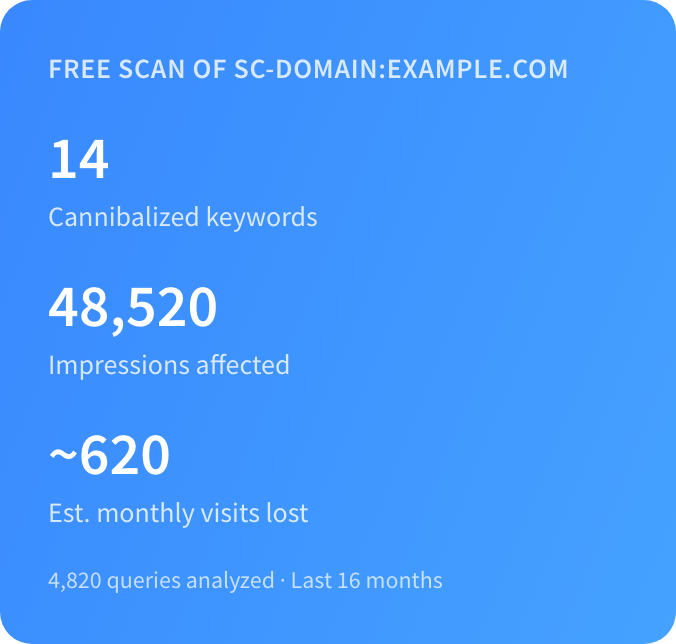
No black box. The free scan reads your real Search Console impressions and positions, counts every clash, and works your worst one in full — the two competing URLs, the day-by-day flip-flop chart, and the exact fix. Here’s a real sample.
A real sample scan
- 14
- clashes found
- 48,520
- impressions affected
- ~620
- monthly visits lost
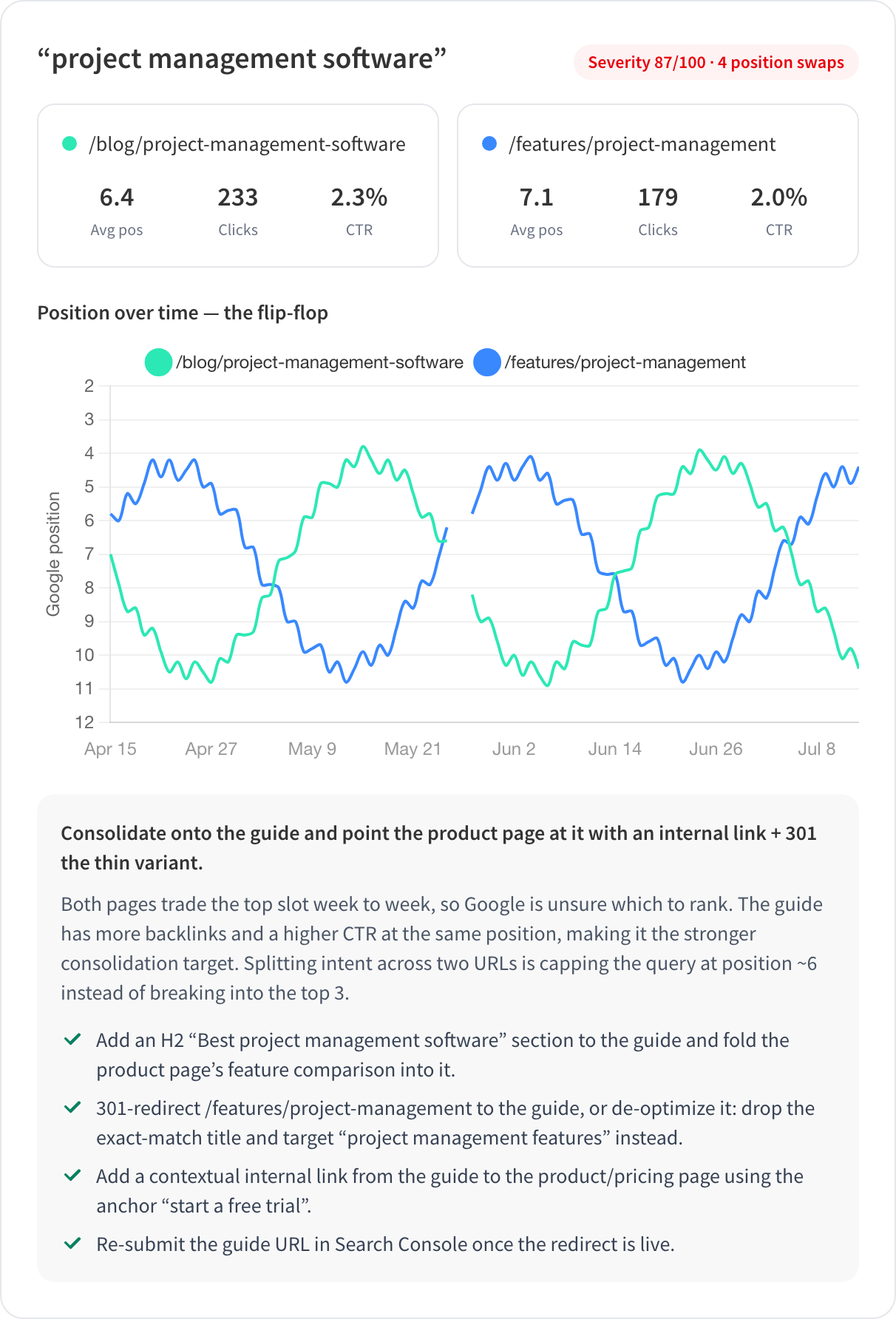
Worst offender, worked in full
“project management software” — severity 87/100, two pages swapping the lead
This is a sample. Your scan shows your own site’s real numbers.
Trying to find needles in the SERP stack?
Cannibalization is detective work, and the culprit is hiding among your own pages. Your rankings flip-flop — this URL one week, that one the next — and the clicks split between two pages that should have been one.
Finding it by hand means exporting Search Console, building pivot tables, and squinting at which pages overlap. This tool reads the same data and does it in under a minute — from your real impressions and positions, not a crawl-based guess at what your pages are "about".
How it works
- 1
Connect Search Console
Sign in with Google, read-only. No account, no credit card, no signup form — the OAuth screen is the whole setup. Pick which verified property to scan.
- 2
We scan your real query data
We pull up to 16 months of your Search Console data — every query, every page — and re-check clash candidates day by day to see which URL Google actually favors. Most scans finish in under a minute.
- 3
See the clashes and how to fix them
Your worst clash comes back in full — both URLs, the queries they fight over, the position flip-flop chart, and the recommended fix. Unlock the rest for a one-time fee.
What the report looks like
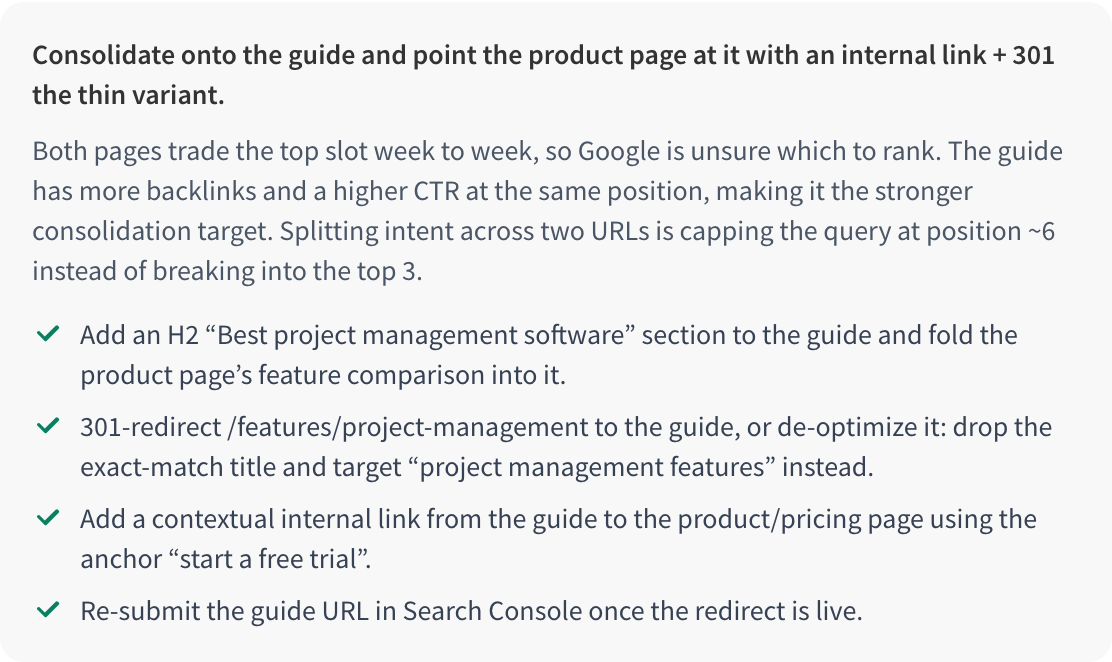
Every clash is a page pair, the queries they compete on, and a specific recommendation — merge, canonical, de-optimize, or differentiate. Here is what a report looks like.
How we detect cannibalization
Two pages showing up for the same keyword is not automatically a problem — sometimes it is winning twice. The engine is built to tell real cannibalization apart from harmless double-rankings, using your own Search Console data rather than a guess from a crawl.
We start from impression share, not just "two URLs appeared"
For every non-branded query above a minimum impression floor (auto-scaled to your site size so small sites still get results), we look at how the impressions are split across your URLs. A query becomes a clash candidate when two or more of your pages each capture a meaningful share — roughly 20%+ each — or when two pages both hold an average position inside the top 30. A page that grabs 2% of a query is not competing with your main result; we ignore it.
We measure daily flip-flop volatility
Averages hide the tell-tale sign of cannibalization. For each candidate we re-query the data day by day and compute which URL led on each day, then count how often the lead switched. A high switch rate means Google keeps swapping which of your pages to rank — the classic cannibalization signature — and it scores higher than a pair where one page quietly leads the whole time.
We suppress the false positives that fool manual analysis
Most "cannibalization" a spreadsheet flags is not cannibalization. Before a pair is reported it has to survive four checks:
- URL normalization — tracking params and UTMs are stripped so one page is not double-counted as two.
- Locale / hreflang alternates — language or region variants of the same page are not fighting each other.
- Stable double-rankings — if both pages hold steady, distinct positions, that is ranking twice on the SERP, not cannibalizing. We leave it alone.
- Sitelink patterns — a homepage plus a deep page with a wide, stable position gap is a normal sitelink cluster, not a clash.
We cluster by page pair and score severity
A single fix usually resolves several queries at once, so we group clashes by the page pair that causes them — the pair plus every query they fight over and the total impressions at stake. Each cluster gets a severity score of impressions affected × volatility × how close the two pages rank, so the report leads with the clashes actually costing you traffic, not the noisiest ones.
Why not just check by hand?
You can find cannibalization in a spreadsheet or with a crawl-based tool. Here is what each approach actually sees.
| This tool | Manual GSC analysis | Crawl-based checkers | |
|---|---|---|---|
| Data source | Your real Search Console impressions, clicks and positions | Same data — but you export and pivot it yourself | A crawl of your pages; guesses intent from on-page text |
| Detects the actual clash | Yes — queries where your pages genuinely split impressions | Only if you build the right pivots and know what to look for | Approximate — flags pages with similar keywords, not real SERP overlap |
| Flip-flop volatility | Measured day by day from your data | Practically impossible by hand | Not available — a crawl has no time dimension |
| False-positive suppression | Locale, sitelinks and stable double-rankings filtered out | Up to you to catch | Frequently flags harmless double-rankings |
| Tells you what to do | A per-clash fix card: keep, merge, canonical or differentiate | You decide | Usually stops at "you may have cannibalization" |
| Time to result | Under a minute | An afternoon of exports and pivots | A full crawl, then interpretation |
Frequently asked questions
What is keyword cannibalization?
Keyword cannibalization is when two or more pages on your own site compete for the same search query, so Google is unsure which one to rank. Instead of one strong page you get two weaker ones that trade positions and split clicks — you end up competing against yourself.
How do I fix keyword cannibalization?
It depends on the pair. The usual fixes are: merge the two pages and 301-redirect the weaker one, add a canonical from the weaker page to the stronger, de-optimize the page you do not want ranking, or differentiate the two pages so they target genuinely different intents. The paid report gives a specific recommendation and the exact edits for each clash it finds.
Is the checker free?
The scan is free and runs on your real data — you always see your total clash count, the impressions affected, and your single worst clash worked out in full. You only pay a one-time fee to unlock the complete list of clashes and every fix recommendation.
Do you store my Search Console data?
Your Google access is read-only and your tokens live only in an encrypted session for the duration of the scan — never in our database. Scan results are cached encrypted for 7 days so re-runs are instant, and paid reports are kept for 90 days before automatic deletion. You can delete everything at any time.
How is this different from Semrush or Ahrefs?
Semrush and Ahrefs estimate rankings from their own third-party index and bundle cannibalization into a large subscription suite. This tool reads your actual Search Console data — the ground truth of how Google ranks your pages — does one job, and charges once. No subscription, no seats.
How is this different from crawl-based checkers like Sitechecker or Geoptie?
Crawl-based checkers spider your pages and guess at cannibalization from on-page text similarity. They have no idea which pages actually compete in Google, because a crawl has no impression or position data. We read your real Search Console numbers, so we detect clashes that genuinely happen in the SERP — and measure the day-to-day flip-flopping a crawl can never see.
How long does the scan take?
Most scans finish in under a minute. Very large properties are capped at the top queries by impressions to keep it fast, and the report tells you when that cap was applied.
Is some keyword cannibalization actually fine?
Yes. Two pages holding steady, distinct positions for a query is ranking twice, not cannibalizing — that is a good thing, and we deliberately do not flag it. Cannibalization only hurts when Google cannot decide, so your pages swap positions and dilute each other. The detector is built around that distinction.
What do I get when I pay?
The full interactive report: every clash the scan found, each as a fix card with the page to keep, the recommended action, and the specific edits — plus a CSV export, emailed to you and available for 90 days.
What is your refund policy?
Refunds are automatic within 7 days, no questions asked. If the report was not useful, request a refund and it is processed — we would rather refund than run a support desk.
Keep going
Low Hanging SEO Fruit Finder
Already cleaned up your clashes? Find the page-2 keywords one nudge from page 1.
GuideHow to find and fix keyword cannibalization
The full playbook: merge, canonical, de-optimize, or differentiate — and how to pick.
GuideInternal keyword cannibalization, explained
How pages on the same site end up fighting each other, and how to spot it early.
GuideWhat is keyword cannibalization (and when it is fine)
The plain-English definition, the myths, and the cases where two rankings are a good thing.
GuideChecking keyword cannibalization in Ahrefs & Semrush
Where the report lives in each tool, what rank-tracker data can and cannot prove, and the faster GSC route.
Trusted by SEOs
“Keylogs gives me more actionable insights than Semrush and the like! It definitely helps me and my team a lot.”
 Flavio Amielfrom Guiajando · Guiajando
“This is how search insight should look like — a real time saver when it comes to SEO.”
 Loukman Nacikfrom bounceless.io · bounceless.io
Find your cannibalizing keywords in one scan.
Free scan on your real Search Console data, your worst clash worked out in full. Sign in with Google — read-only, no account, no card.